Alternative accelerator watch · Intel Arc Pro
Intel Arc Pro B50 and B70: the workstation alternative lane to watch
Intel's Arc Pro B50 and B70 are not NVIDIA cards, but they matter to NVIDIA buyers because they change the price/performance conversation around local AI, workstation graphics, and memory-heavy desktop systems.
Why this belongs on a NVIDIA buyer site
usednvidia.com is still focused on NVIDIA hardware. But serious buyers should watch adjacent accelerators because they affect budgets, resale expectations, and the "do I really need CUDA?" decision.
Intel Arc Pro B-series cards are especially relevant for local AI workstations, design and engineering seats, media workflows, and teams experimenting with non-CUDA inference stacks.
The quick split
Intel Arc Pro B50: compact workstation and local AI starter
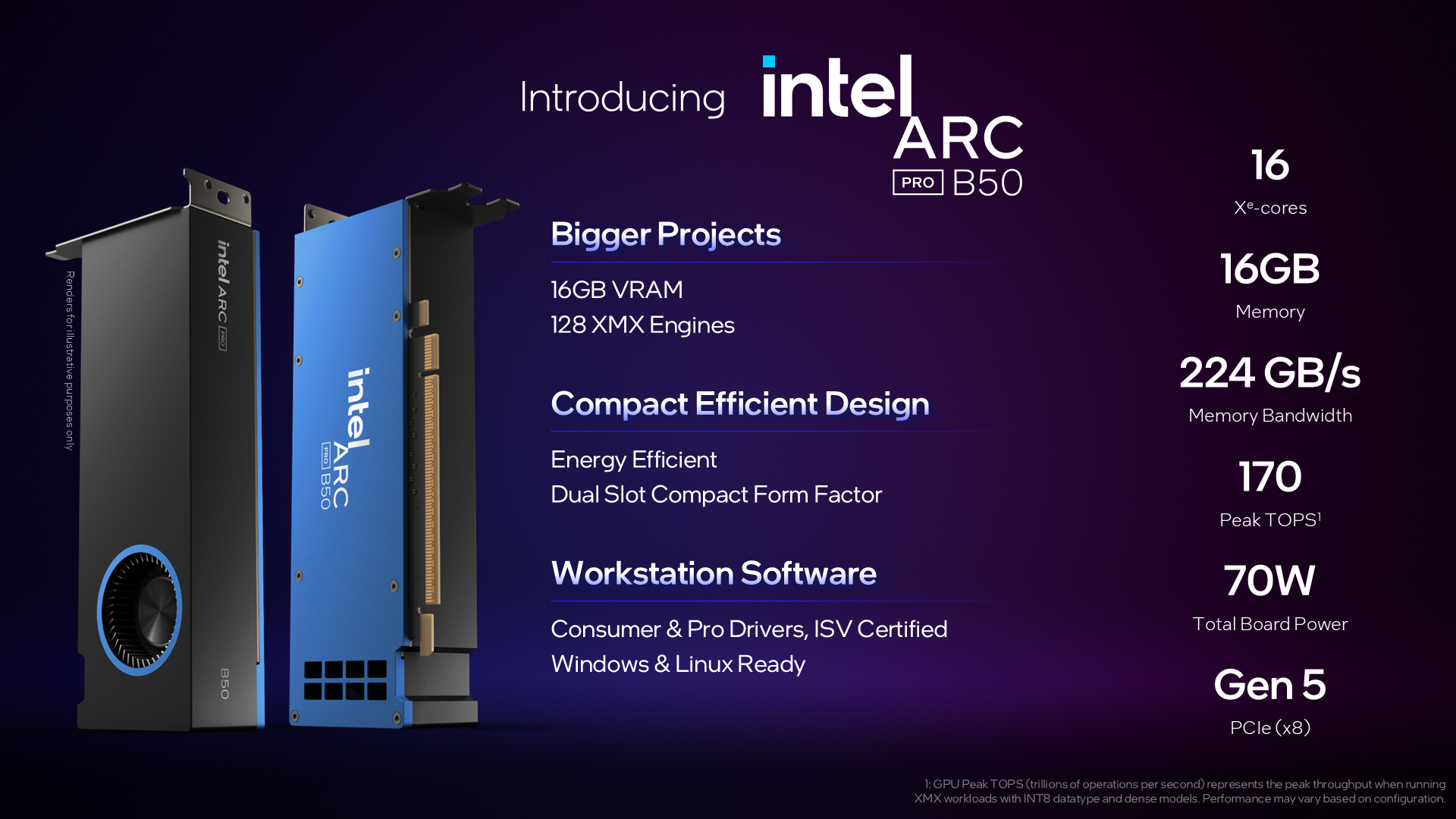
Intel positions the Arc Pro B50 as a compact dual-slot workstation GPU for everyday professional work such as design and engineering, with local AI acceleration and low power requirements.
The buyer story is straightforward: 16GB of GDDR6 in a small-form-factor professional card with ISV-oriented positioning. That can be interesting for CAD, media, light local inference, office workstations, and budget-conscious teams that want more memory than many entry workstation cards provide.
The caution is equally straightforward: 16GB is useful, but the software stack matters. If the workflow assumes CUDA, NVIDIA plugins, or a tested NVIDIA deployment path, the B50 may be a research option rather than a drop-in replacement.
Intel Arc Pro B70: 32GB workstation AI lane
Intel positions the Arc Pro B70 as a higher-end workstation GPU for demanding AI inference and complex professional workloads, with 32GB of GDDR6, Xe2 architecture, XMX AI engines, pro drivers, ISV certifications, and Windows/Linux support.
The B70 is the more strategically interesting lane because 32GB changes the local AI conversation. More graphics memory can help with larger local models, richer scenes, bigger media timelines, and multi-user or multi-agent inference experiments where memory capacity becomes the first wall.
Intel also emphasizes Linux multi-GPU AI scaling for the B-series. That matters for workstation builders thinking beyond one card, but buyers should verify exact runtime support, driver version, framework path, board vendor, cooling, and power before treating multi-GPU claims as plug-and-play.
How to compare against NVIDIA
- CUDA-first workloads: NVIDIA usually remains the safest lane when the app, framework, model server, or vendor support path expects CUDA.
- OpenVINO / oneAPI / Intel-tested workflows: Intel Arc Pro becomes more interesting where the software is known to run well on Intel GPUs.
- Memory-per-dollar experiments: B50 and B70 may be worth watching when memory capacity is the main constraint and the workload can tolerate Intel's software path.
- Professional workstation apps: check ISV certification, driver branch, app version, and board-vendor support before buying.
- Used-market listings: verify exact B50/B70 model, memory, outputs, board form factor, warranty, seller photos, and whether the listing is a partner board or Intel-branded card.
Practical buyer cautions
The main mistake is treating 16GB or 32GB as the whole story. Memory is only useful when the driver, runtime, application, and model path can use it reliably.
For AI inference, ask for proof of the exact model/runtime you care about: OpenVINO, IPEX, oneAPI, SYCL, Vulkan, llama.cpp, vLLM through Intel tooling, or a specific application integration. For workstation graphics, ask for the exact software and version: AutoCAD, SolidWorks, Maya, Revit, Blender, Adobe tools, or another certified/proven workload.
Check Intel Arc Pro listings carefully.
Use these searches as market scans, then verify software support before treating Arc Pro as an NVIDIA replacement.
Arc Pro B-Series overview
Intel's product-family page for the Arc Pro B50 and B70 workstation GPU lane.
Arc Pro B70 specifications
Intel's product specification page for the 32GB Arc Pro B70 graphics card.
Computex 2025 press kit
Launch context and official product imagery used for this buyer note.